Display Filters (KFL)
Kubeshark Filter Language (KFL) is a display filter language powered by Common Expression Language (CEL). It filters network traffic according to specific rules — instead of searching for the needle in the haystack, it filters out the haystack to reveal the needle.
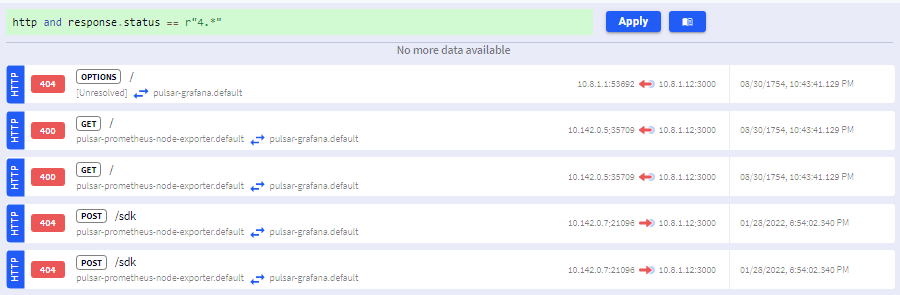
For example, to only see HTTP responses with client error status codes (400–499):
http && status_code >= 400 && status_code < 500Click the Apply button to filter the traffic stream:
KFL vs. Capture Filters
KFL should not be confused with Capture Filters as they serve different purposes:
| Aspect | Display Filters (KFL) | Capture Filters |
|---|---|---|
| Purpose | Filter what is displayed | Filter what is captured |
| Impact | Dashboard view only | Resource consumption |
| Scope | Single browser tab | Cluster-wide |
| Syntax | CEL expressions | Helm values / Dashboard |
For those familiar with Wireshark, KFL is analogous to Wireshark’s Display Filters, and Capture Filters to Wireshark’s BPF (Berkeley Packet Filter) filters.
Queryable UI Elements
When you hover over UI elements and they display a green + sign, the element can be added to your query. Clicking appends the corresponding filter expression.
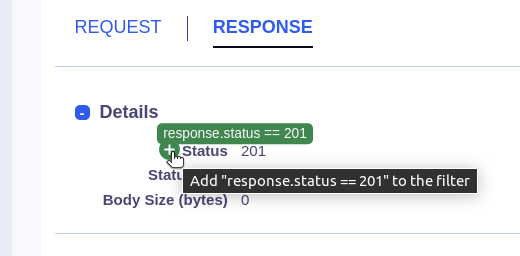
This makes it easy to build complex filters without typing the full expression.
Quick Examples
# HTTP server errors
http && status_code >= 500

# Traffic to a specific namespace
dst.pod.namespace == "production"

# DNS queries for a domain
dns && "example.com" in dns_questions

# Filter by pod labels (safe access)
map_get(local_labels, "app", "") == "payments"

# Slow requests (over 5 seconds)
http && elapsed_time > 5000000

# Recent traffic
timestamp > now() - duration("5m")
Full Reference
For the complete KFL syntax, all supported variables, and advanced examples, see the KFL Reference.